Does the submitted form message not show up in your mailbox?
1. When submitting to an email address that is not associated with your domain
example: yourname@gmail.com
Siphon includes an option titled Declare Custom “From”‘. Enabling this will allow you to set a value for the PHP email “From” Header. This is useful if you are having trouble getting your message to send to an address not associated with your domain. After enabling this option, place your domain email address in the new field titled “From:”. This should be an email account that either your host provided or you set up that contains your website's domain name.

2. When submitting to an email address that is associated with your domain
example: yourname@yourwebsite.com
There may be an issue either with the server not sending the email or a spam filter catching it. Please check your hosting company’s spam filtering policy.
Does the Autoreply not get delivered to the user who submits the form?
The "Reply To:" field defines the email address Siphon will send the Autoreply to. It should be set to the ID of the slide that gathers the user's email address. Do not include brackets when placing the slide’s ID in this field.

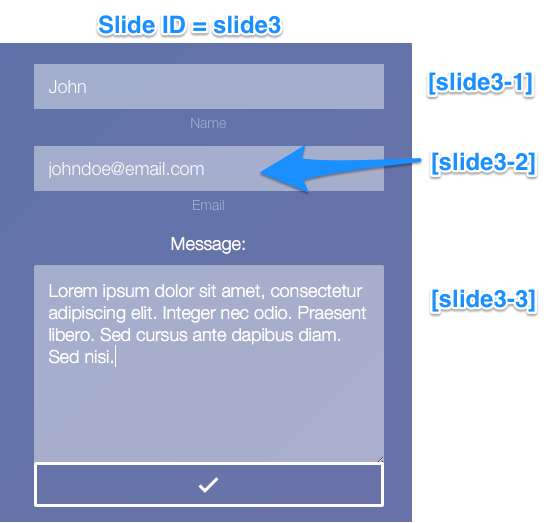
If the slide that gathers the user email address contains multiple answer types (learn more here), you will need to reference which value you want to use by adding a dash (-) followed by a number representing it’s placement order. For example, If I had two input fields and one text field in a single slide, and I wanted to get the email address from the second input field, my resulting ID would be:
slide3-2
Are you still having issues getting the Contact Form to work?
Contact your host for advice. Ensure they are able to send an email from the server using PHP mail() and ‘sendmail’. (Check below to see a sample message to send to your host.)
Sample message to send to your host:
Hello,
I am currently having trouble sending emails via a contact form on my webhost. a) It would appear that everything is working just fine and the mail is sent yet I do not receive an email. OR b) It would appear that the server is unable to send an email from my server using the PHP mail() function. Would you be able to tell me whether I must do anything specific in order to send an email using your servers. The PHP code relies on sendmail and the standard PHP mail() function and PHP sessions to send the emails.
Regards,
Jon Doe